


AIO Launcher
4.5913.00 Reviews
App Specs
- Version
- 7.4.2
- Updated On
- License
- Free
- Downloads
- 1,000,000+
- Developer
- AIO Mobile Soft
- Categories
- Personalization
- Platform
- Android
Screenshots
 Analysis by AppCompare
At home, a phone is often more than a personal gadget: someone may ask to check the weather, find a contact, or change the music while the device is in your hand. That shared moment is where AIO Launcher makes an interesting case. It puts useful information in one text-led home screen, so I can glance at what is happening without opening a string of apps. I also learned quickly that a shared glance is not the same as a shared account: the launcher changes how the phone is presented, not who owns its information.
A home screen that works for quick handoffs
Imagine getting dinner ready while a family member asks whether it will rain and another wants to skip a song. With weather information and player controls on the home screen, those small requests can be handled without navigating through several separate screens. That is a practical strength, especially when I am using the phone myself and someone else is simply looking over or asking for help.
The same layout can help in less casual situations. If I use one device to keep track of calendar events, notifications, and frequently used apps, a glanceable feed reduces the need to remember which app holds each detail. It does not make the phone a family dashboard, though. I would treat it as a personal launcher that happens to make certain information easier to show, rather than as a tool for coordinating multiple people or profiles.
Set boundaries before handing over the phone
A dense information screen can be convenient, but it can also put details in view when I would rather keep them private. Notifications and calendar events are useful to me precisely because they are visible at a glance; that same convenience deserves a second thought when someone else is holding the device. Before using the launcher around other people, I would review what appears on the home screen and decide whether the current notification and event previews suit the way I share my phone.
There is a useful distinction here: changing the launcher is not the same as creating separate accounts or restricting access. I would not hand a phone to a child or guest assuming this interface creates a protected mode. For a brief request, I can stay present and open the specific item they need. If the device is regularly shared, the important decision is still how the phone itself is set up and what its owner is comfortable exposing.
Coordination without pretending it is a family organizer
For everyday coordination, the launcher is most helpful when the household already uses the same phone for quick checks. A calendar event on the feed can remind me of an appointment while I am deciding what to do next, and music controls can make it easier to manage listening in a shared room. Those are small conveniences, not a shared scheduling system: people still need to agree on calendars, communicate changes, and use the relevant apps for the details.
I would also keep account boundaries clear. The feed may bring information from different parts of my phone into one place, but that does not mean it combines each household member’s accounts or automatically keeps their activity separate. If several people need their own contacts, calendars, or preferences, a device setup designed for separate users is a better starting point. AIO Launcher is more useful when one person owns the phone and others occasionally interact with it.
Worth Reading Before You Choose

EA SPORTS FC Mobile 26 Is a Bigger Football Game, but It Takes Time

Flipboard Shows What News Apps Must Do Beyond the Feed

Switching to Android Auto Means Rethinking Your Driving Routine

Google Calendar Makes a Crowded Week Easier to Manage

Ludo King Makes the Most of the Minutes Between Plans

Baby Panda World Brings Quick Play to Modern Phones, but Its Game Library Feels Busy
Age, trust, and a sensible fit
The app has an Everyone age rating, and it is free to install, with optional in-app purchases ranging from under a dollar to around thirteen dollars per item. It comes from AIO Mobile Soft, has been available since late 2017, and its current version is 6.3.1 for Android 8.0 and later. It has a 4.5 average from around seventeen thousand ratings, with more than a million installs. Those details give me useful context, but they do not replace a parent’s judgment about what information is visible on a particular phone.
I would recommend it most readily to an adult or older teen who owns their device, likes having practical information close at hand, and is willing to learn a different home-screen rhythm. I would be more cautious about choosing it for a young child’s first phone or for a device passed around without supervision. The interface can make useful items easy to reach, but ease of access is not the same thing as age-specific controls. If supervision and separate access are the priority, I would look at the phone’s built-in family and user settings instead.
For households, the strongest arrangement is usually simple: one person configures the launcher, checks which information is displayed, and explains what others can safely use. That avoids the common misunderstanding that a home-screen redesign changes permissions or privacy. It also makes the launcher’s role clearer: it can speed up routine access, while the phone owner remains responsible for accounts, sharing, and supervision.
How the information-first layout changes daily use
When it comes to Android launchers, there are a ton of options out there, each promising to transform your home screen into something more efficient or visually appealing. But if you're like me and you're looking for something a bit off the beaten path, then AIO Launcher might just catch your eye.
First Impressions
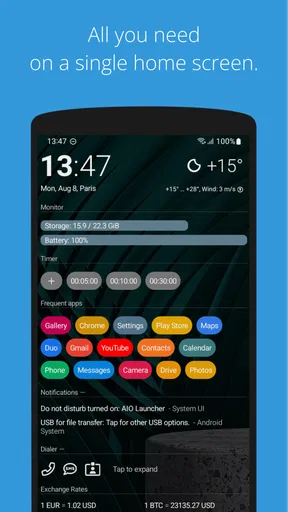
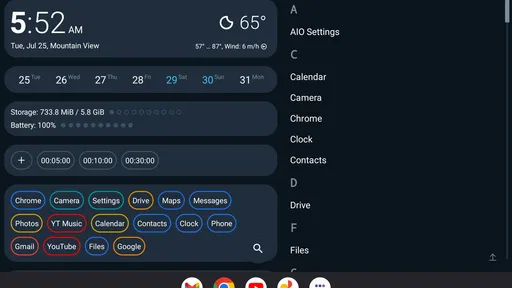
Upon installing AIO Launcher, the first thing I noticed was how different it is from the usual flashy, colorful launchers. Instead, it opts for a more minimalist and information-dense approach. Rather than focusing on vibrant icons and widgets, AIO Launcher presents your home screen as a feed of crucial information. It's almost like having a command center right at your fingertips.
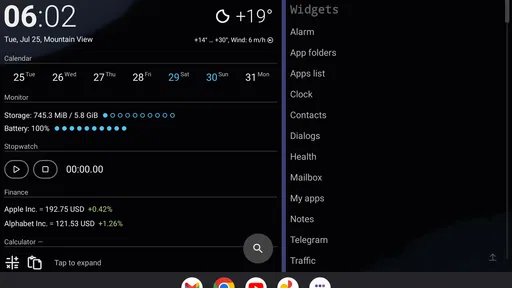
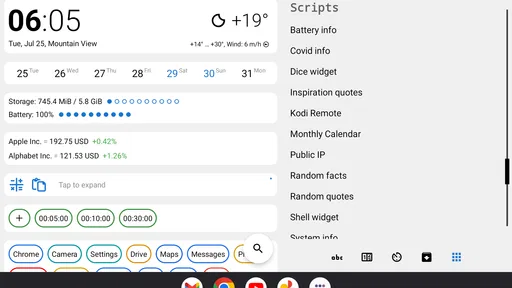
This launcher might not win any beauty pageants, but it’s all about utility. The home screen is a hub of information—weather updates, notifications, player controls, calendar events, and more—all organized into a sleek, scrollable list. It's perfect for anyone who wants to maximize efficiency and stay on top of everything without diving into multiple apps.
Features That Stand Out
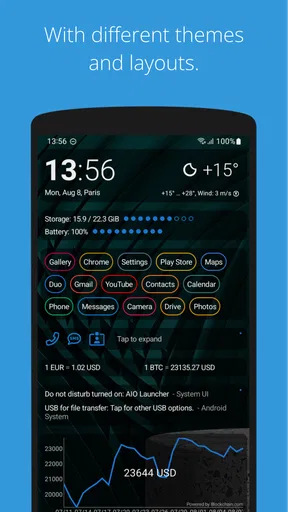
Let’s dive into some of the features that make this app stand out. First off, the customization options are pretty impressive. While the interface might seem a bit rigid at first glance, you can actually tweak a lot of elements to suit your preferences.
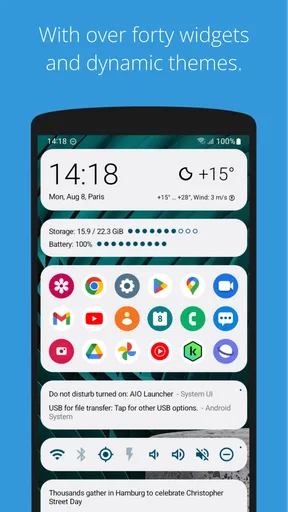
- Widget Support: You can add additional widgets to the feed, ensuring that your most-used tools are always just a swipe away.
- Task Management: With its built-in task manager, you can keep an eye on your running apps, manage your phone’s performance, and even kill tasks that are hogging resources.
- Integration: AIO Launcher integrates well with other apps. For example, if you’re using a fitness tracker or a music streaming service, you can manage them directly from your home screen.
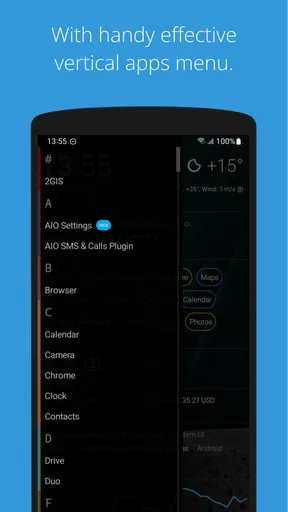
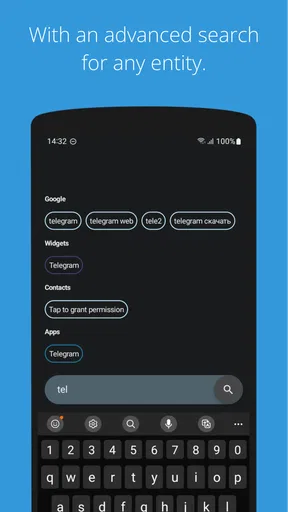
And let’s not forget about the search functionality. With a quick swipe, you have access to an incredibly fast search bar that lets you find apps, contacts, and even web searches seamlessly. It’s a lifesaver when you have a ton of apps installed.
Getting Used to the Interface
I'll be honest; it took me a bit to get used to AIO Launcher's unique interface. If you're coming from a more traditional launcher, you might find the lack of icon grids a bit jarring. But trust me, once you get the hang of it, the efficiency is unparalleled.
The design is very much text-focused, which might not be everyone's cup of tea, but it does grow on you. The learning curve is well worth the payoff as it gives you a concise snapshot of your phone’s activity at a glance.
Is It Right for You?
If you’re someone who values function over form, AIO Launcher could be a game-changer. It’s perfect for productivity enthusiasts who want everything accessible without the frills. However, if you’re someone who loves customization, vibrant themes, and a flashy interface, this might not fulfill all your needs.
One thing to note is that while the app offers a free version, some of the more advanced features require a paid subscription. So, if you end up loving it as much as I did, it might be worth the investment.
Choosing it over a conventional launcher
The key comparison is not simply whether this launcher has more features than a standard icon-grid layout. It asks me to change what I expect a home screen to do. A conventional launcher puts app icons and visual shortcuts first; this one makes a scrollable information feed the main event. If I mostly tap the same few icons by habit, the familiar grid may remain quicker. If I often check several kinds of information before acting, the feed can save little bits of navigation throughout the day.
That distinction also helps decide whether the adjustment is worthwhile. I would give myself time to learn where the useful sections sit rather than judging the layout after a single glance. A practical way to start is to keep only the information I genuinely check and add widgets for tools that deserve a place there. Packing the screen with every available item would defeat the point: the advantage is a useful overview, not simply a longer feed.
A few habits that make the feed more useful
One non-obvious trade-off is that visibility can either reduce or increase distraction. Putting notifications and controls in front of me means I can act quickly, but it also makes it easier to notice things I did not intend to check. I would arrange the screen around a routine—perhaps a morning glance at the weather and calendar, then quick access to music during the commute—instead of treating every section as equally important.
Search is another strong shortcut when app icons are no longer the main navigation method. Rather than trying to remember where an app sits in a grid, I can use the search bar for apps or contacts. That works especially well when the phone has grown cluttered over time. The trade-off is that anyone who prefers browsing by familiar icon position may find searching less satisfying, even if it is efficient once it becomes a habit.
The built-in task manager deserves a measured approach too. I can see why being able to review running apps and stop a task sounds appealing, but I would not make a habit of ending apps just because they appear there. If something is behaving badly, task management can be useful; routine force-closing is not automatically a better way to use a phone. I would treat it as an occasional troubleshooting option, not the main reason to install a launcher.
Who will enjoy the change—and who will not
This is a particularly good fit for someone who wants a more informational Android home screen and is comfortable trading decorative icon layouts for a compact overview. It may also suit a person who relies on search to get around, checks calendar and weather details frequently, or wants music controls within easy reach. The customization and widget support give room to shape the feed, but the overall text-focused character remains part of the experience.
I would skip it if my main goal were a dramatic visual makeover, a conventional grid that works exactly like the phone’s default launcher, or a dedicated setup for several people sharing one device. It is also a weaker fit if I dislike reading small blocks of information on the home screen or would rather keep notifications out of immediate view. In those cases, the standard launcher or a more visual alternative is likely to feel more natural, even if it offers less of the feed-style overview.
There is also a useful middle ground: I do not have to think of the choice as permanent. I can try the information-first approach, notice whether I actually use the feed and search, and switch back if the new routine adds friction instead of removing it. A launcher should make the phone feel easier to use; if I keep reaching for the old icon-grid habits, that is a fair reason to prefer a more familiar option.
Final Thoughts
In a world where launchers often compete to outdo each other with eye-catching visuals and animations, AIO Launcher is a breath of fresh air for those who prioritize straightforward access to information. While it might not be for everyone, it certainly fills a niche that many productivity-focused users will appreciate.
So, if you’re ready to try something different and see your home screen from a whole new perspective, give AIO Launcher a shot. Who knows? It might just be the change you didn’t know you needed.
Pros
- Highly customizable interface.
- Efficient use of screen space.
- Integrates multiple apps seamlessly.
- Minimalistic design enhances speed.
- Supports various widgets and plugins.
Cons
- Steeper learning curve for beginners.
- Limited color theme options.
- Lacks in-depth tutorials.
- Some features require payment.
- Not as visually flashy as others.
FAQs for AIO Launcher
What makes AIO Launcher different from other launchers?
AIO Launcher stands out by focusing on functionality and information density rather than flashy graphics and animations. It presents a clean, information-rich home screen that displays weather, notifications, and frequently used apps. This design approach is ideal for users who prioritize efficiency and quick access to essential data.
Is AIO Launcher suitable for all Android devices?
AIO Launcher is compatible with most Android devices, but it's particularly well-suited for users who appreciate minimalist and data-centric interfaces. While it performs well on a wide range of devices, users with older models may experience some limitations regarding speed and customization options.
How customizable is AIO Launcher?
AIO Launcher offers a variety of customization options, allowing users to tailor the experience to their preferences. You can change the theme, adjust widgets, and configure the app drawer. However, its customization features are more focused on functionality than aesthetics, catering to users who value utility over visual appeal.
Does AIO Launcher impact battery life?
AIO Launcher is designed to be efficient and lightweight, minimizing its impact on battery life. Its focus on displaying essential information without unnecessary animations or graphics helps conserve energy, making it a suitable choice for users concerned about battery consumption.
Is AIO Launcher free to use, and are there in-app purchases?
AIO Launcher is available for free, offering a broad range of features without requiring payment. However, some advanced features and customizations are available through in-app purchases. These optional purchases enhance functionality and provide a more personalized user experience for those who seek additional capabilities.


